Parts get assigned to machines that cannot run the file, do not have the material, or still need bed clearing.
Cloud print farm control
Turn scattered 3D printers into a managed production queue.
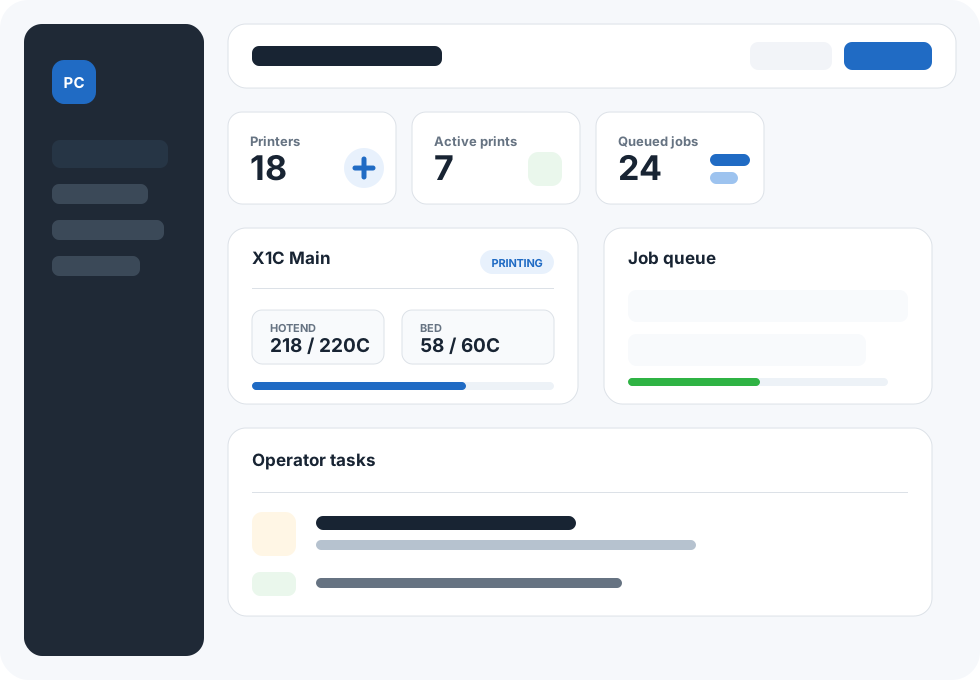
Print Control gives teams a cloud dashboard for Bambu LAN and Klipper printers, with smart routing, filament-aware scheduling, operator tasks, and a local relay that keeps printers off the public internet.
Team accounts
Pi relay
Bambu LAN
Klipper ready
Bambu X1 Carbon
Bambu A1 Mini
AMS / AMS Lite
Klipper
Moonraker
Quick answer for buyers
What is Print Control?
Print Control is 3D print farm management software for teams running repeatable production on Bambu LAN printers and Klipper/Moonraker printers. It combines a cloud dashboard with a local Raspberry Pi or Linux relay, so printer communication stays inside the workshop network.
The platform manages printer status, job queues, reusable G-code parts, part variants, filament and AMS slot assignment, operator tasks, camera viewing, WooCommerce order intake, team workspaces, invites, and shared production visibility.
- Best for
- Small production farms, print service operators, Etsy/WooCommerce sellers, prototyping teams, and teams running repeatable 3D printed parts.
- Printer support
- Bambu X1/P1-style printers, Bambu A1/A1 Mini, AMS and AMS Lite workflows, plus Klipper printers through Moonraker.
- Network model
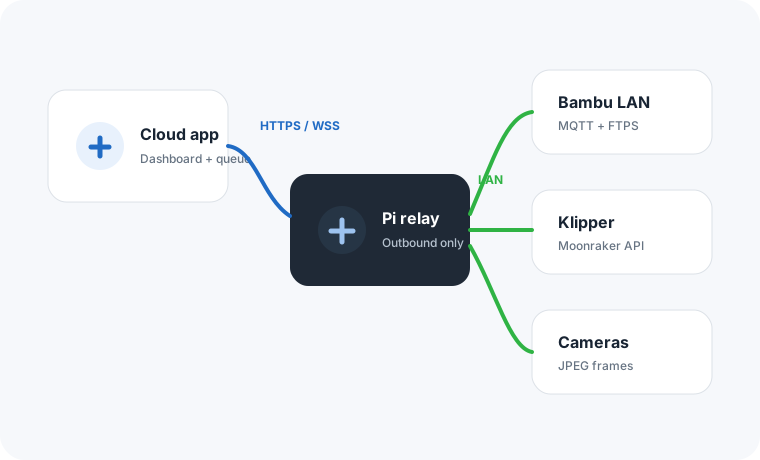
- Outbound-only relay connection. No public printer ports, no router port forwarding, and no direct cloud access to printer LAN services.
- Commerce workflow
- WooCommerce products can map to one or more Print Control parts, including colour variations using synced Print Control filaments.
Why teams switch
Most farms outgrow manual slicing, spreadsheets, and printer-by-printer checks.
The hard part is not pressing print. It is knowing which machines are free, which material is loaded, what needs clearing, and how many finished parts are actually ready.
Teams need one task list for bed clears, failed prints, alerts, filament changes, and printers that need attention.
Printer LAN services should stay private, while managers still need status, cameras, and queue control from anywhere.
Platform
Everything an operator needs on one dashboard.
Queue jobs, track active prints, manage filaments, and give operators a clear task list without exposing printer network services to the internet.
Smart job routing
Send parts to idle printers that match the required printer family and loaded filament.
Parts library
Store sliced variants for A1, X1/P1, and Klipper printers with previews and reusable print settings.
Filament control
Build a shared filament library, assign AMS slots, and match multi-colour jobs to the right machines.
Operator tasks
Surface bed clears, failed prints, offline printers, and manual release tasks in a simple work stream.
Production workflow
From a sliced file to finished parts without babysitting every printer.
Print Control is designed around the real loop of a small production farm: upload a proven part, set the quantity, keep printers fed, and give operators the next clear action.
Create a reusable part
Upload Bambu .gcode.3mf or Klipper G-code, keep the original file, extract thumbnails, and add variants for each printer family.
Map loaded material
Assign library filaments to single-spool printers, AMS Lite slots, or multiple X1/P1 AMS units labelled A through D.
Queue the quantity
Tell Print Control how many parts you need. Jobs start paused, then run when a manager starts the queue.
Let free printers pick up work
The scheduler matches printer type, material, availability, manual-clear rules, and remaining quantity.
Relay architecture
Cloud visibility without opening printer ports.
A small Raspberry Pi or Linux relay sits on the printer LAN and connects outbound to Print Control. It handles local status checks, uploads, printer commands, discovery scans, and camera frames.
- No inbound firewall rules at the farm site.
- Relay-backed network search finds Bambu and Moonraker printers.
- One Pi 5 can cover roughly 20-40 printers for normal dispatch and status polling.
Farm operations
Built for the things that slow down real print farms.
The platform connects job planning, printer readiness, filament setup, local-network control, and team coordination into a single workspace.
Printer fleet view
See Bambu and Klipper status, temperatures, progress, camera state, alerts, and loaded material in one place.
Operator mode
Give floor staff a focused list of clear-bed tasks, failed-print checks, printer alerts, and ready buttons.
Part library
Reuse approved G-code, keep thumbnails, manage variants, download originals, and avoid repeated uploads.
Multi-material routing
Match single-colour and multicolour jobs to printers with the right filament in the right spool or AMS slot.
Team workspace
Invite teammates, keep each team's printers and jobs separate, and give managers and operators the same queue view.
Local control path
Use relay tasks for printer status, dispatch, camera frames, network scan, home, temperature, and stop commands.
20-40
printers per Pi 5 relay target
2-6
simultaneous camera views per relay
0
printer ports exposed to the internet
16
X1/P1 AMS slots supported per printer
Who it helps
Designed for teams printing repeatable parts, not one-off hobby jobs.
Small production farms
Run batches of customer parts, spares, fixtures, jigs, packaging inserts, and shop products.
Design and prototyping teams
Keep shared printers useful without asking everyone to watch every machine or know every spool.
Print service operators
Give operators the next action, managers the queue, and customers a more reliable turnaround.
Before and after
Replace manual coordination with a queue that understands the farm.
Print Control does not just list printers. It connects printer capability, material, parts, quantities, operators, and local-network control into one repeatable workflow.
Without Print Control
- Files are resent manually for every repeat run.
- Operators check each printer one by one.
- Filament availability lives in memory or a spreadsheet.
- Remote visibility means trusting fragile network workarounds.
- Completed quantity is counted after the fact.
With Print Control
- Reusable parts hold approved variants and thumbnails.
- The scheduler finds capable idle printers automatically.
- Filament library and AMS slots drive job matching.
- The relay keeps printer access local and private.
- Jobs show remaining quantity, active printers, and progress.
WooCommerce integration
Turn store orders into print jobs automatically.
For teams selling printed products, Print Control can connect to WooCommerce so mapped products create print jobs without a manager re-uploading files or copying order details by hand.
- Available on selected plans for teams selling printed products.
- Map each WooCommerce product to one part, or multiple parts for kits and bundles.
- Sync your Print Control filament library and map colour variations to required filaments.
- Leave variants blank to let Print Control pick the right A1, X1/P1, or Klipper file.
- Write private order notes when each individual print starts and completes, including the printer name.
WooCommerce
Order #1842
2 x mapped product
Sync
Print Control
Job queued
Part ID, quantity, and optional variant are sent securely.
Install the plugin
Download the Print Control WooCommerce plugin from the app and paste a team integration token.
Map products
Add one or more part IDs, optional variant IDs, quantity multipliers, and variation-specific filaments.
Queue from orders
When an order reaches Processing or Completed, Print Control creates an idempotent paused job.
Sync order notes
WooCommerce can show when each printed item starts, completes, and which printer handled it.
Team workspace
Give managers and operators the same source of truth.
Each team gets its own printers, relays, parts, jobs, filaments, events, and operator workflow, so daily production is clear without sharing spreadsheets or machine-by-machine notes.
Separate team spaces
Keep each team's printers, relays, parts, jobs, filaments, integrations, and events separate from other teams.
Invite teammates
Add operators and managers to the workspace so everyone can see the queue, printer status, and next actions.
Self-service access
Users can register, accept team invites, and recover account access without waiting for a manager to recreate accounts.
Operator-friendly updates
Release notes appear in the app after user-facing changes so teams can understand workflow updates quickly.
Plan by printer count
Choose a team plan based on the number of printers you want to manage, then grow the workspace as the farm expands.
Shared production history
Review events, printer history, completed parts, and queue progress from the same team workspace.
Plans
Simple, transparent pricing
Choose the printer allowance that fits your farm, then expand as your team adds more machines.
Loading live pricing...
FAQ
Questions before connecting a farm?
Print Control is built around LAN-mode printers and outbound relay connections.
Do printers need to be exposed to the internet?
No. A relay on the local network connects outbound to Print Control and talks to printers locally.
Does it support Bambu AMS?
Yes. You can enable AMS Lite for A1-style printers, or define up to four AMS units for X1/P1-style printers and assign filaments to A, B, C, and D slots.
Can it work with Klipper printers?
Yes. Klipper printers are managed through Moonraker for upload, status, cancel, and G-code commands.
Can WooCommerce orders create print jobs?
Yes, on plans where WooCommerce is enabled. Install the plugin, map products to one or more Print Control part IDs, sync the filament library for colour variations, and orders can create paused jobs automatically. The plugin can also add order notes when each print starts and completes.
Can I invite teammates?
Yes. Teams can invite operators and managers so printers, jobs, parts, filaments, relays, and events are shared in one workspace.
What does the relay need?
A Raspberry Pi or small Linux computer on the printer network. It connects outbound to Print Control and handles local printer communication.
Start building your farm workflow
Bring your printers, relays, parts, and operators into one control plane.
Start with 5 printers free, connect one relay, then add printers as your team grows.